
Slack is one of the most widely used tools for team communication. People rely on it to share updates, manage projects, and collaborate across different time zones. But Slack can also create challenges. When conversations spread across multiple channels, key details are buried. Manual reporting takes time. New members struggle to find context.
Model Context Protocol (MCP) offers a better way. MCP does not just organize data, it enhances Slack with structured context and automation. The Slack MCP Server extends this even further by enabling AI assistants to mirror core Slack functions—channel management, message handling, scheduling, and user engagement. With MCP, Slack becomes a workspace where information is not only exchanged but also tracked, summarized, and acted upon.
Problems With Traditional Slack
Slack helps teams talk, but three main problems remain:
- Information overload. Too many channels and messages make it hard to find what matters.
- Manual work. Leaders prepare updates by hand, scrolling through history.
- Lost context. Why a decision was made can disappear in scattered threads.
Example: When a bug fix is discussed in several threads, the person working on it must chase details. Later, no one can see in one place why a certain fix was chosen.
What is MCP?
MCP, or Model Context Protocol, is a framework that tags and organizes data across platforms. In Slack, MCP creates a searchable layer where people can ask natural questions and get direct answers.
How it works:
- It automatically tags messages.
- It stores context for later search and summaries.
- It supports prompts like: “Show me all issues reported this week.”
Instead of navigating dashboards or threads, team members can retrieve insights instantly.
Key Benefits of MCP in Slack
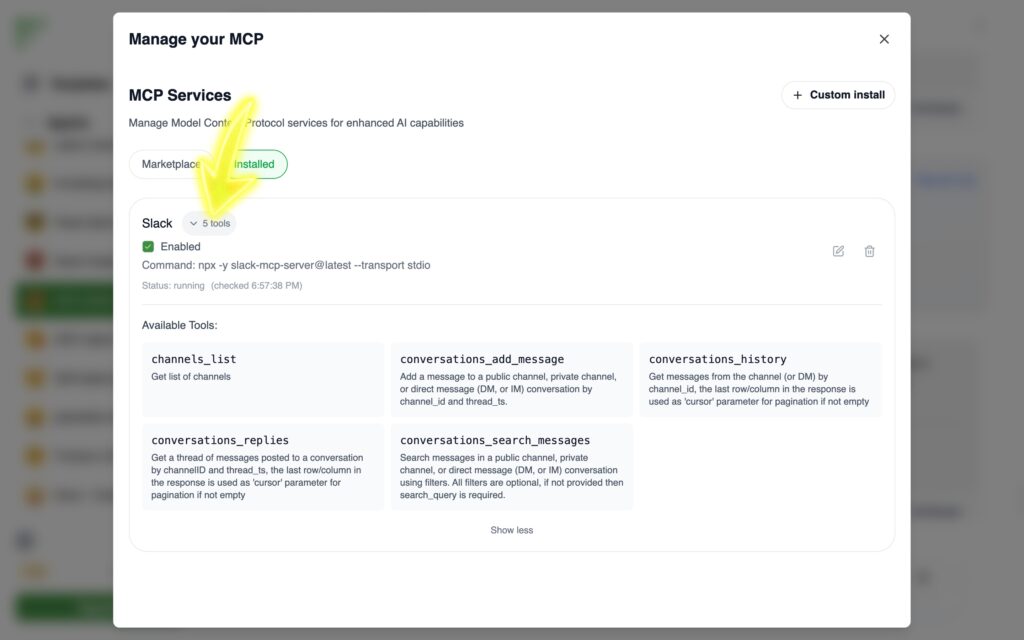
The Slack MCP Server extends Slack with powerful functions:
- Channel Management: Retrieve lists of channels with details like topics, member counts, or creation dates. This makes it easy to navigate a workspace and know where discussions belong.
- Channel History Access: Get recent messages for context, so AI or team members can follow conversations without missing key parts.
- Messaging Capabilities: Post formatted messages, reply in threads, or schedule announcements for later. Teams can automate reminders or send digests at set times.
- User Engagement: Add emoji reactions, personalize messages with user profiles, or see workspace demographics to tailor communication.
- Reliable Infrastructure: Built with TypeScript, asynchronous architecture, and secure token handling, the server is designed to handle heavy use while protecting sensitive data.
Example: Instead of a manager manually reminding a team about deadlines, MCP can schedule a message: “Reminder: Project report due today at 3 PM.” It posts automatically and includes context if needed.
How to Combine MCP With Slack
MCP is not only about analytics—it can reshape how Slack is used daily.
- Grouped Messaging: Collect updates from several channels and post a unified summary. Example: all bug reports in one digest.
- Accumulated News Feed: MCP scans channels and delivers a daily or weekly news-style update. Example: company-wide highlights at 9 AM every Monday.
- Automated Standups: Instead of everyone posting updates, MCP compiles recent work from channel activity into one post.
- Topic Tracking: Ask “What are people saying about the new launch?” MCP gathers relevant discussions across channels.
- Scheduled Reminders: Send frequent reports—such as top 5 customer issues—on a fixed schedule.
- Cross-team Sharing: If marketing info is relevant to sales, MCP forwards a digest automatically.
MCP Compared With Old Slack Analytics
| Feature | Old Slack | Slack with MCP |
|---|---|---|
| Channel navigation | Manual search | Structured, with metadata |
| Reporting | Written by users | Auto-made and prompt-based |
| Scheduling | Limited reminders | Flexible, scheduled posts |
| Engagement | Manual replies/reactions | Automated, AI-assisted |
| Security | Handled by admins | Built-in secure handling |
For example, without MCP, a manager must dig through channels to count feature requests. With MCP, they type: “MCP, show all new requests this week.” The result appears in seconds.
How to Start Using MCP in Slack
Step 1: Install the Slack MCP Server and connect it with your workspace.
Step 2: Allow it to access relevant channels.
Step 3: Try simple prompts:
@MCP Summarize design feedback from this week.
@MCP Post tomorrow’s team standup at 9 AM.
The assistant handles tagging, summaries, and scheduling automatically.
Conclusion
Slack is valuable, but it becomes even stronger when paired with MCP. The Slack MCP Server brings structure to conversations, turns unstructured data into insights, and automates repetitive tasks. It reduces noise and creates clarity.
By using MCP, teams can save time, track decisions, and collaborate with less friction. Slack stops being only a place to chat—it becomes a hub of organized knowledge and action.