
Many marketers have this problem. They log into Google Analytics. They see many charts, numbers, and sources of traffic. They want answers. For example, they need to know which campaign worked. They need to know where they lose leads. They want to know what to fix now. The dashboards show too much information. It is hard to see the most important parts.
There is a new way. This is MCP.
What is MCP (Model Context Protocol)?
MCP means Model Context Protocol. MCP is a new standard for data. MCP helps AI get context from tools like Google Analytics.
Before MCP, users needed to look through many dashboards. They had to connect many event tags. It was manual work. With MCP, AI agents can use plain language to “talk” to Google Analytics.
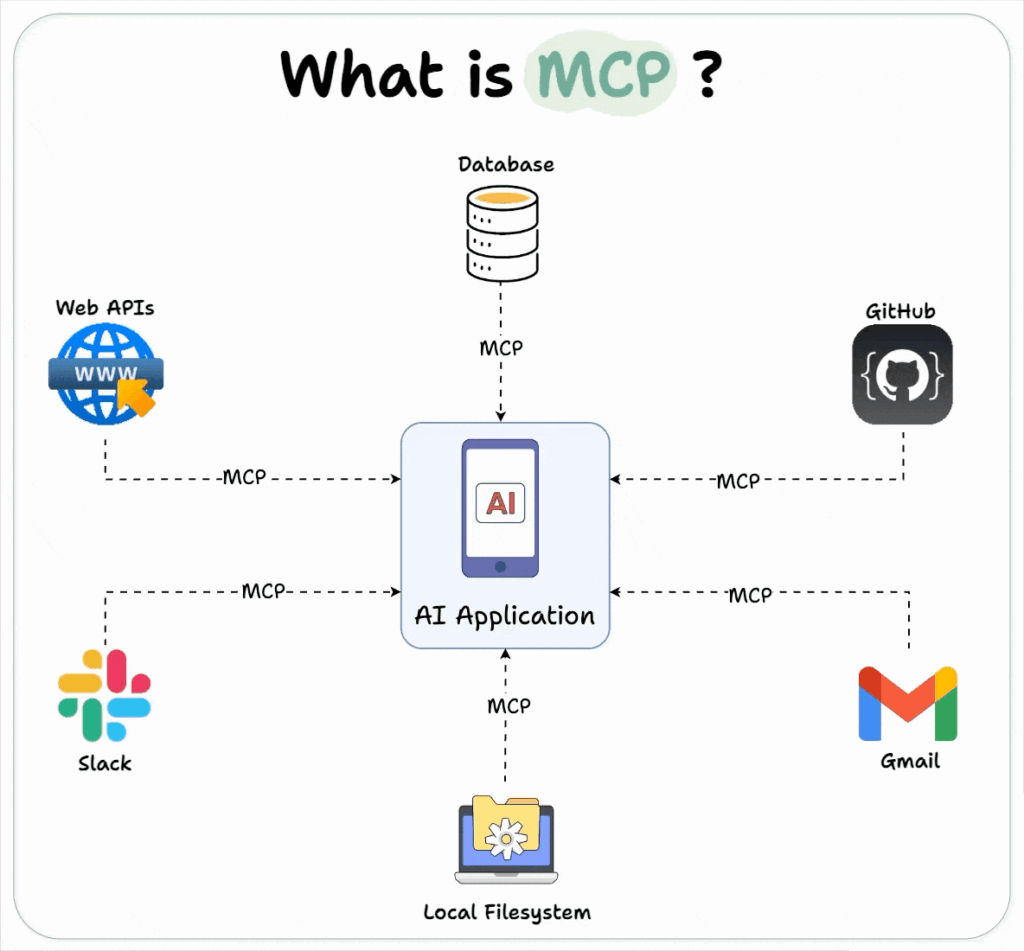
Example:
A person can ask Google Analytics with MCP:
“Which campaign brought in the most signups last week?”
MCP understands the question. It finds the answer. It puts the answer together. The person does not have to guess.
MCP and Google Analytics Working Together
MCP lets users go past basic charts. People can use questions in the way they really think.
Example questions:
- “Which funnel step loses the most users?”
- “What traffic source gives the best ROI?”
- “Which product pages drive repeat visits?”
Google Analytics has this data. MCP makes it easier to use. The data is there. MCP makes it simple to ask and get answers. People do not spend hours on dashboards or creating new filters. They get answers they can use now.
MCP vs Old Analytics Tagging
The old way is different.
Old way:
- People have to make UTMs and complicated events.
- They spend weeks to create dashboards.
- They have to decide which data is significant regarding different objectives.
New (MCP) way:
- MCP understands the question context.
- No extra tags are needed. AI reads the question and gets the real answer.
Example:
Frevana is a workflow AI platform. It uses MCP. Frevana connects Google Analytics data to documents, reports, and calendars. People do not need to open dashboards. The platform gives useful results immediately.
Using MCP for Conversion Funnels
This can be seen in a real example.
Real-world scenario:
Frevana uses MCP to get data from Google Analytics.
It reports: “Your webinar → Notion doc → Signup path converts 3× better than cold traffic.”
A person does not look at each step. MCP tells which step works. It says directly what to change or keep. There is less dashboard work.
Why Frevana Helps
Frevana makes it easy. People do not need to write new scripts. They do not need to build more dashboards.
A person just asks:
“Show me the top campaign last week.”
The system uses MCP.
Frevana finds the Google Analytics data.
It shows the key findings in a clear way.
It gives links to plan a new campaign.
It gives updates for the team.
It lets someone set up the next steps.
Extra Example:
Frevana can send MCP answers to Slack, Notion, or Zoom. Teams work in these places. The Google Analytics data goes wherever the team needs it, not just inside dashboards.
Future Outlook
Here is what the future may look like. MCP agents get important context from many places—GA, Slack, Zoom, Notion, Hubspot, and more.
Frevana is building this future. Many marketers may soon have an AI analyst. The AI can say not only what happened, but also explain why it matters and when action is needed.