How to Turn the Anatomy Skill into an Agentic App in Five Minutes
Learn how to turn a skill into a shareable Frevana Agentic App with a clear prompt, an interactive interface, and a public link.
A skill can give an AI Agent specialized capabilities: a repeatable workflow, a preferred way of reasoning, or a particular kind of output. An Agentic App makes that capability easier for other people to use. Instead of asking people to reproduce a prompt or understand the underlying skill, you can give them an interface built for the task.
This guide walks through a practical example: turning the Anatomy skill into an interactive explainer. The finished app lets a person enter a topic and receive a visual, interactive explanation. The same process applies to many other skills, from research and analysis to content production and operations workflows.
What You Will Build
The goal is a simple Agentic App with three parts:
- An input where someone can specify what they want explained.
- The Anatomy skill, which gives the Agent the capability to build an interactive explanation.
- A clear action that starts the generation process and presents the completed result.
You do not need to write the application by hand. Describe the experience you want, add the relevant skill, and let Frevana create the first version of the app. You can then review and refine it before sharing it.
1. Start with a Focused App Prompt
Begin in the Frevana app builder and describe the outcome you want a user to have. A useful prompt names the skill, the intended interaction, and the expected result. It does not need to specify every visual detail; the initial objective is to give the builder a clear product direction.
For this example, use the following prompt:
Create an Agentic App that uses Anatomy to explain any topic interactively.
Let users enter a topic, then use Anatomy to create a clear interactive explanation.
Add the Anatomy skill to the prompt, then select Start to begin building the Agentic App.
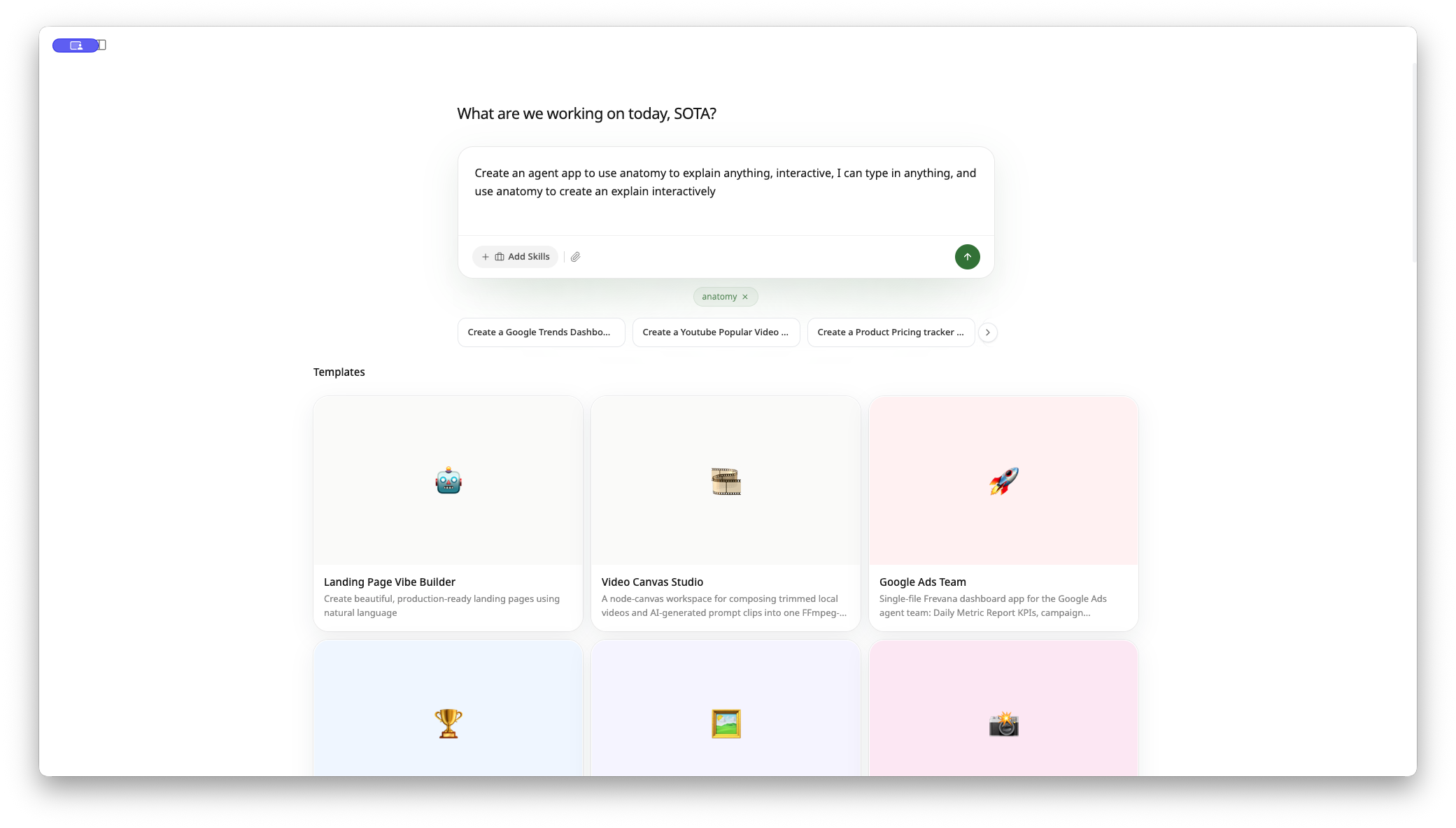
Why this prompt works
The prompt is short, but it establishes the important constraints:
- Capability: use Anatomy rather than a generic text response.
- User input: let the person specify the topic.
- Experience: make the explanation interactive.
- Outcome: produce a clear explainer rather than an open-ended chat.
For a production app, you can add audience, tone, or output requirements. For example, an education-focused version might ask for age-appropriate language and a short knowledge check at the end. Start with the core workflow first; refine the details after you can see the initial app.
2. Review the Generated Agentic App
Frevana generates the initial app in a few minutes. When it is ready, review the result as a product experience rather than only as a prompt response. Check that the purpose is obvious, the user knows what to enter, and the primary action is easy to find.
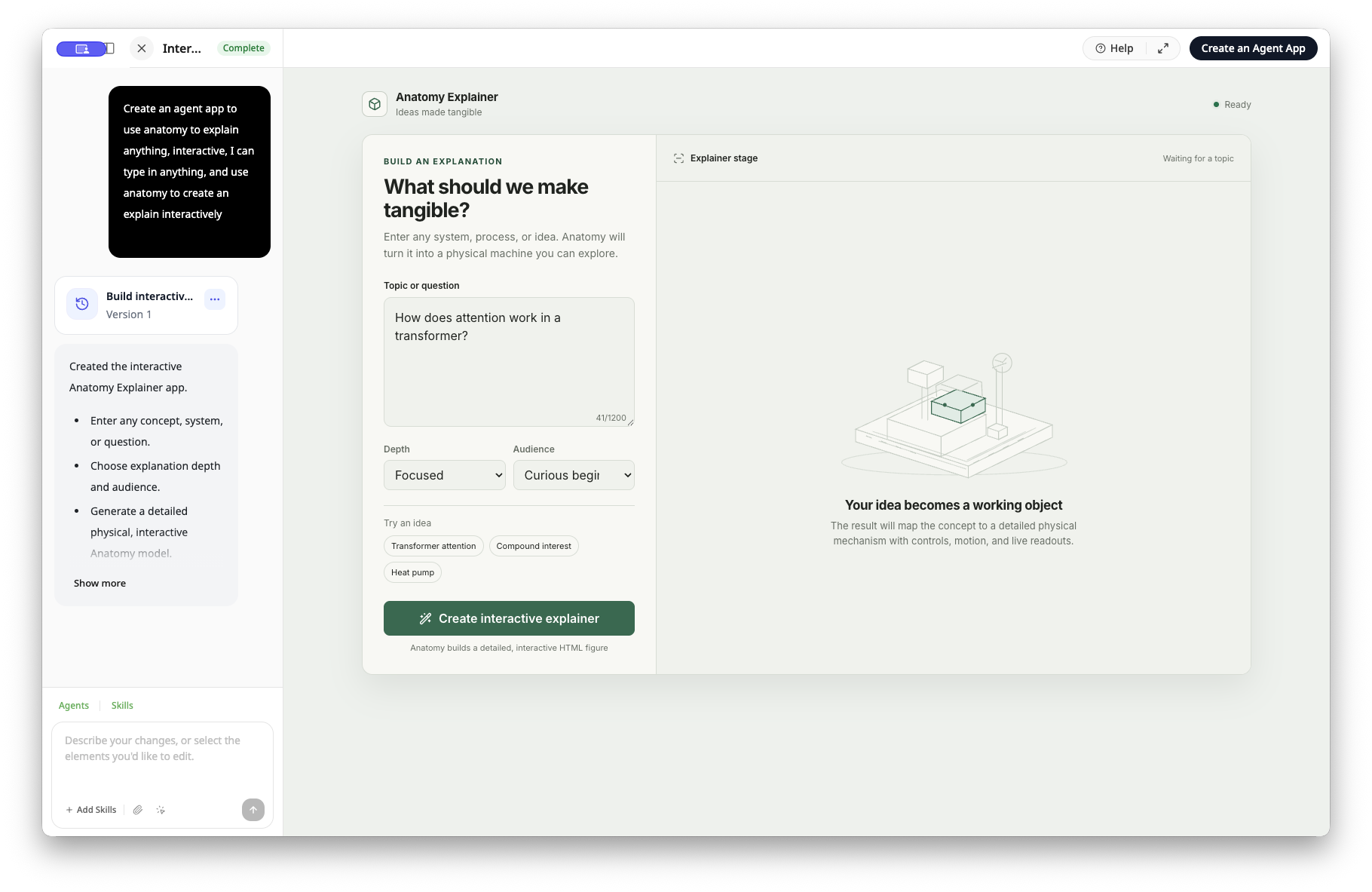
At this stage, you can iterate in two useful ways:
- Use the prompt field in the lower-left corner to request broader changes, such as a simpler onboarding flow, more context around the input, or a different presentation style.
- Use the element-selection control to target a specific part of the interface. This is useful when a label, layout element, or individual interaction needs improvement without changing the rest of the app.
In this example, the initial version already provides a focused experience, so it is ready to finalize. Select Create an Agentic App in the upper-right corner to complete the build.
3. Test the Workflow with a Real Topic
Before sharing an Agentic App, run it with a representative request. This confirms both the interface and the skill behavior under realistic conditions.
For the Anatomy explainer, enter a topic such as how attention works in a Transformer, then select Build the explainer. The Agentic App begins processing the request and uses the Anatomy skill to construct the explanation.
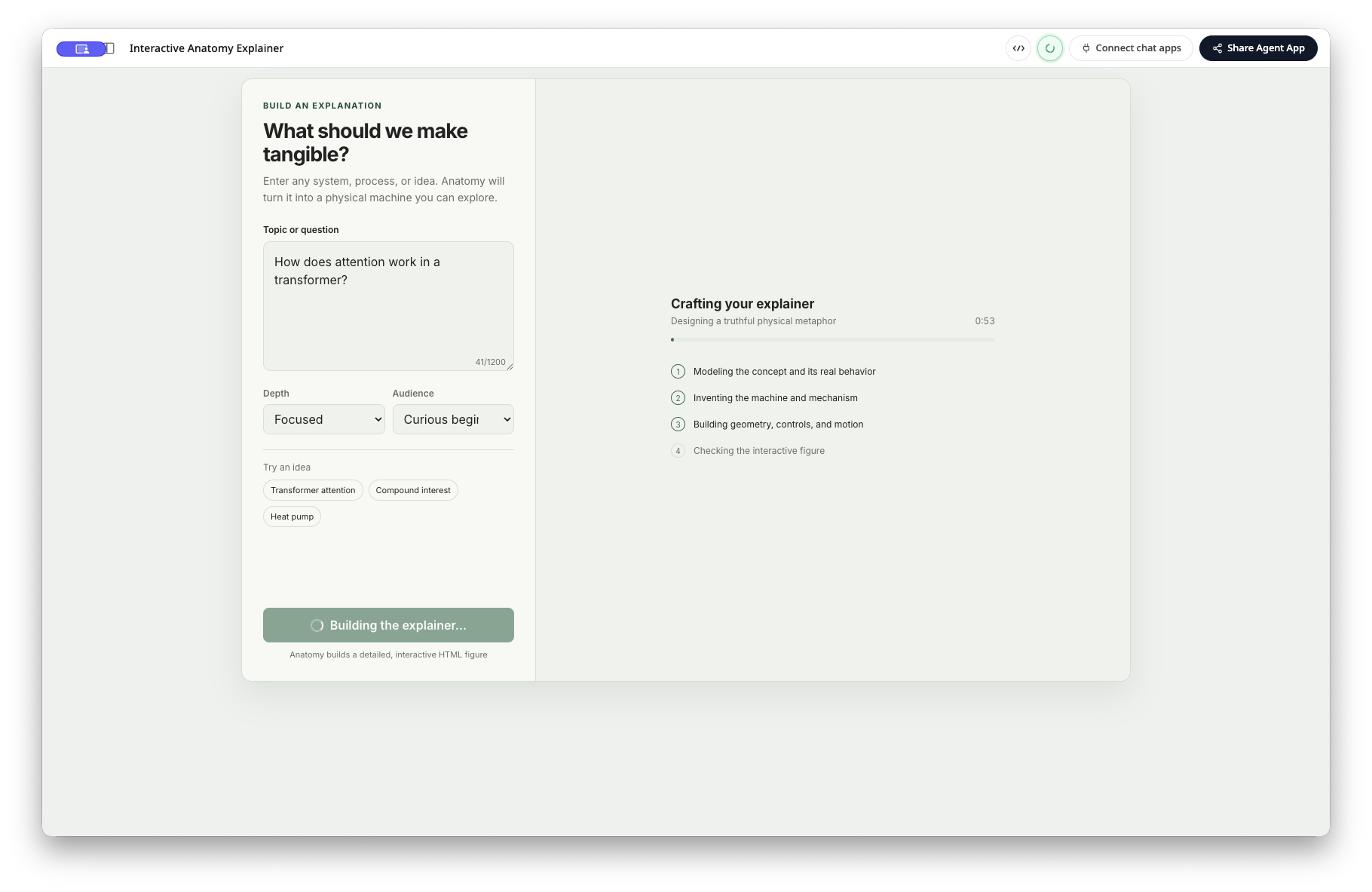
Testing with a real request helps you assess the complete workflow:
- Is the input instruction clear to a first-time user?
- Does the main action communicate what will happen next?
- Does the generated result match the skill's intended level of depth and format?
- Would a colleague be able to use the app without needing additional guidance?
If the answer to any of these is no, return to the editor and make a targeted change. The goal is not perfection on the first pass; it is a reliable, understandable experience for the people who will use it.
4. Review the Finished Experience
When generation is complete, the app presents the explanation as an interactive visual. In this example, the output explains Transformer attention through a designed animation rather than a plain text answer.
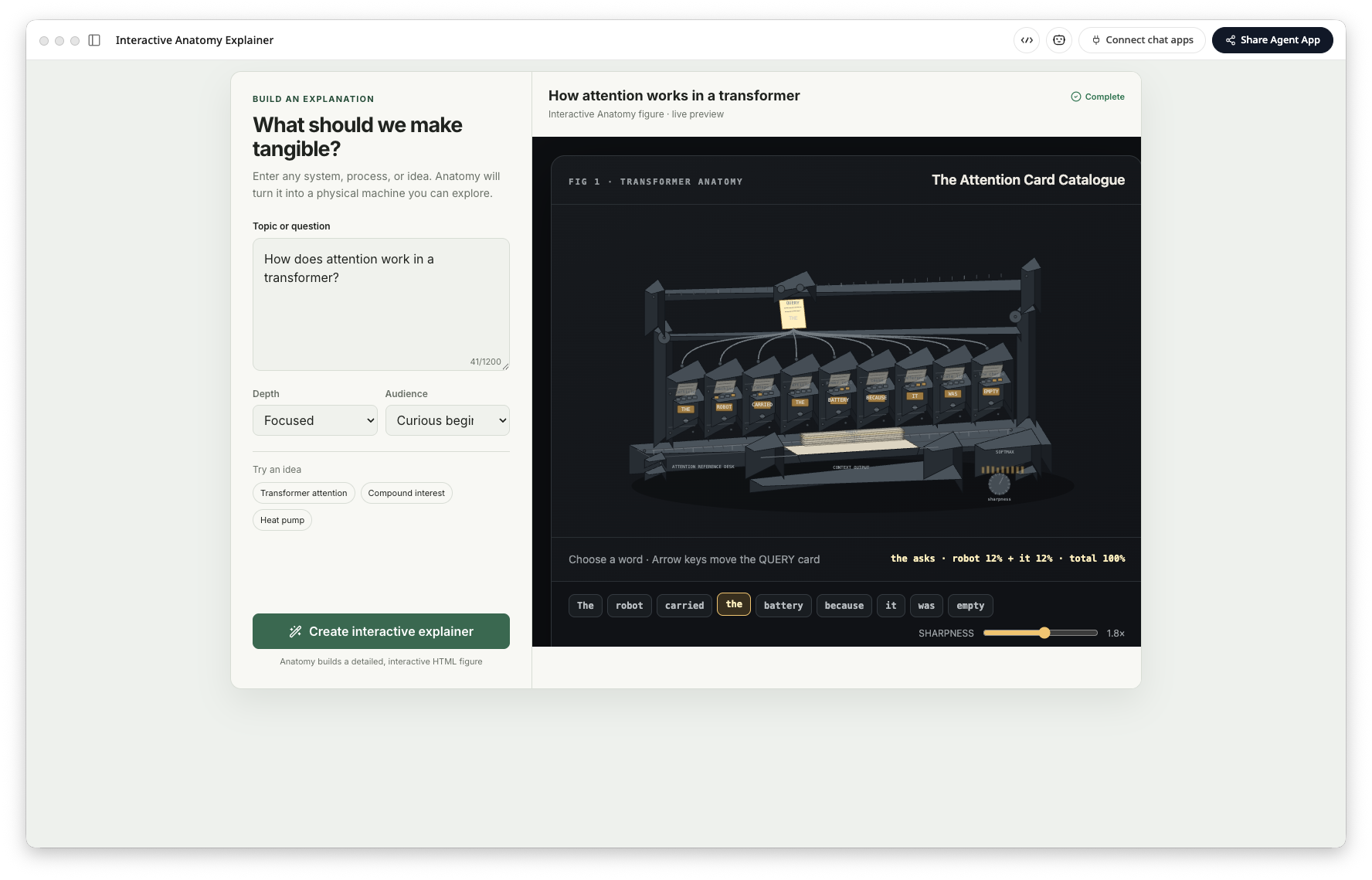
This is the value of turning a skill into an Agentic App. The skill still provides the specialized capability, while the app gives people a purpose-built way to access it. Users do not have to know which skill to invoke or how to formulate the ideal sequence of prompts; they can start with the task in front of them.
5. Share the Agentic App
When the app is ready, select Share Agentic App to publish it as a public link. Anyone with the link can open the app in their browser and use it with their own account.
You can try the completed Anatomy explainer here: Interactive Anatomy explainer.
Sharing turns a useful personal workflow into something teammates, customers, or a broader audience can use directly. They receive the interface, the skill-powered workflow, and the outcome you designed—not just a copy of a one-off conversation.
A Reusable Pattern for Any Skill
The Anatomy example follows a pattern you can reuse for nearly any skill:
- Identify the repeatable outcome the skill can produce.
- Describe a focused user experience around that outcome.
- Add the skill and generate the first version of the Agentic App.
- Test it with real inputs and refine the interface or instructions.
- Publish a link when the workflow is ready for others.
The more clearly you define the user's task and the expected result, the more useful the first version will be. From there, Frevana lets you continue improving the app as the workflow evolves.
Next Steps
Start with one task that people already repeat: explaining a complex concept, preparing a recurring report, reviewing a document, or collecting structured information. Turn that task into a small, focused Agentic App first. Once it works well, share it, learn from how people use it, and iterate on the experience.
That is how a specialized skill becomes a practical piece of software: it keeps the intelligence of the Agent, while giving people a simple interface for putting that intelligence to work.